
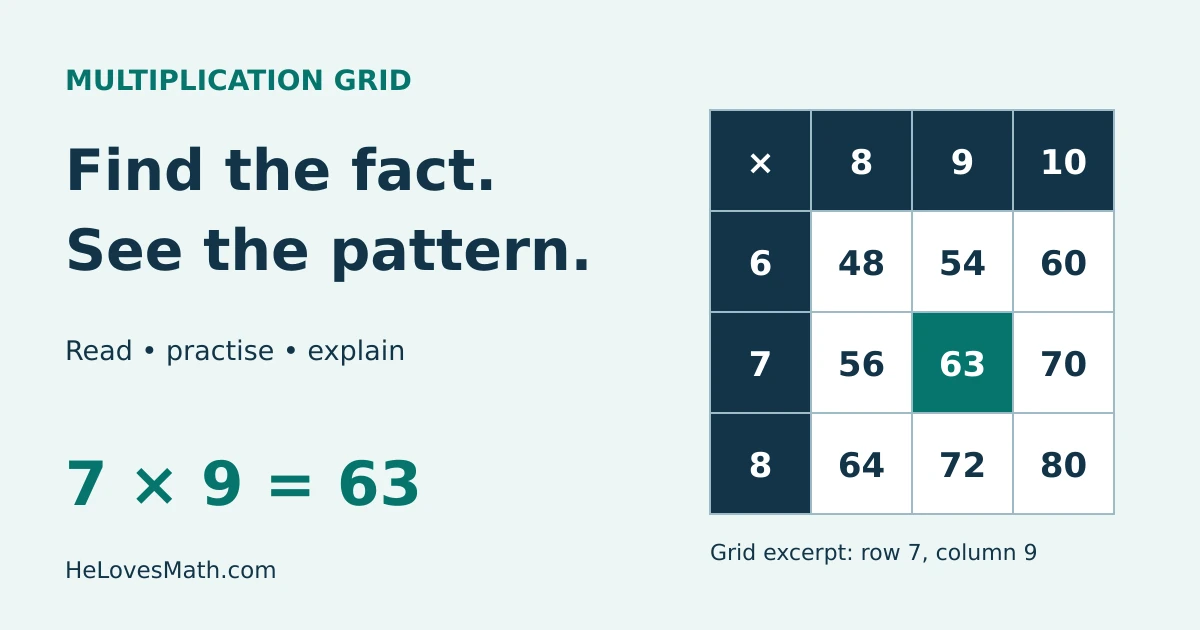
A multiplication grid shows the product of a row number and a column number. Follow row 7 to column 9 and you find 63, so 7 × 9 = 63. Use the complete grid to look up facts, then practise with blank or partly filled grids.
Interactive multiplication grid
Choose 1–10 or 1–12. Blank and Practice let you type answers; Helper explains a selected fact. Changing size or mode, or pressing Reset, clears entered answers. Your work is not saved after reloading.
Grid size ModeRead a row and column to find their product. Use Blank or Practice to enter answers.
On a small screen: swipe the grid sideways. Row labels stay visible. Keyboard users can focus the grid and use the arrow keys to scroll; use Tab to move between answer cells.
| × | 1 | 2 | 3 | 4 | 5 | 6 | 7 | 8 | 9 | 10 | 11 | 12 |
|---|---|---|---|---|---|---|---|---|---|---|---|---|
| 1 | 1 | 2 | 3 | 4 | 5 | 6 | 7 | 8 | 9 | 10 | 11 | 12 |
| 2 | 2 | 4 | 6 | 8 | 10 | 12 | 14 | 16 | 18 | 20 | 22 | 24 |
| 3 | 3 | 6 | 9 | 12 | 15 | 18 | 21 | 24 | 27 | 30 | 33 | 36 |
| 4 | 4 | 8 | 12 | 16 | 20 | 24 | 28 | 32 | 36 | 40 | 44 | 48 |
| 5 | 5 | 10 | 15 | 20 | 25 | 30 | 35 | 40 | 45 | 50 | 55 | 60 |
| 6 | 6 | 12 | 18 | 24 | 30 | 36 | 42 | 48 | 54 | 60 | 66 | 72 |
| 7 | 7 | 14 | 21 | 28 | 35 | 42 | 49 | 56 | 63 | 70 | 77 | 84 |
| 8 | 8 | 16 | 24 | 32 | 40 | 48 | 56 | 64 | 72 | 80 | 88 | 96 |
| 9 | 9 | 18 | 27 | 36 | 45 | 54 | 63 | 72 | 81 | 90 | 99 | 108 |
| 10 | 10 | 20 | 30 | 40 | 50 | 60 | 70 | 80 | 90 | 100 | 110 | 120 |
| 11 | 11 | 22 | 33 | 44 | 55 | 66 | 77 | 88 | 99 | 110 | 121 | 132 |
| 12 | 12 | 24 | 36 | 48 | 60 | 72 | 84 | 96 | 108 | 120 | 132 | 144 |
Complete grid: 144 products shown.
Print Grid prints the current grid, including any answers you entered. To print a worksheet, choose Blank or Practice first. In the print dialog, use portrait orientation and check the preview; you can choose Save as PDF where your browser supports it. For a ready-made download, use our printable times-table PDF pack.
How to read a multiplication grid
The numbers across the top and down the left are factors. The number where they meet is the product. The × in the corner tells you to multiply, not add. Header labels are not extra answer cells: a 10 × 10 grid has 100 products; a 12 × 12 grid has 144.
- Find the first factor in the left-hand row labels.
- Find the second factor in the top column labels.
- Move across that row and down that column to their intersection.
- Read the whole equation aloud, then check it using equal groups or a known fact.
Example 1: read 7 × 9
Row 7 and column 9 meet at 63. Check: 7 × 10 = 70; one fewer group of 7 gives 70 − 7 = 63. Row 9, column 7 also contains 63.
Example 2: use a known fact for 7 × 8
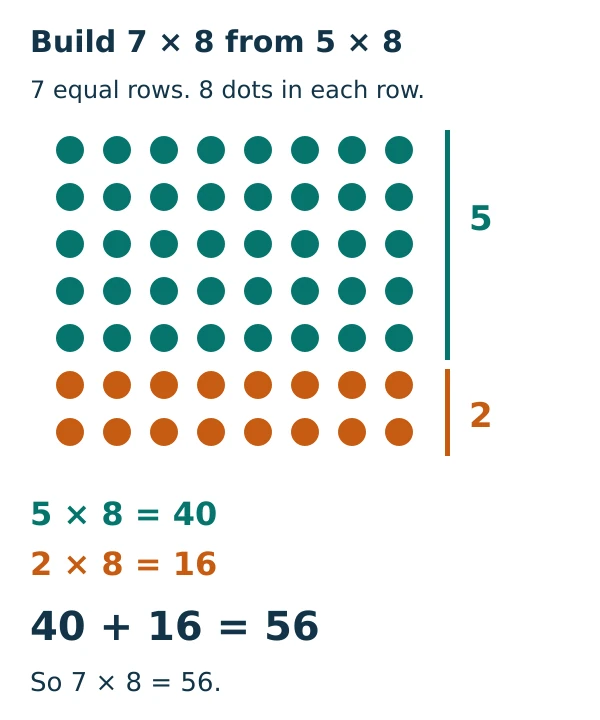
Split seven groups into five groups and two groups: 7 × 8 = (5 × 8) + (2 × 8) = 40 + 16 = 56. The array below has seven rows of eight dots. Both coloured parts together make the original array.
Example 3: find a missing factor
For 6 × □ = 48, scan row 6 until you reach 48. Its column is 8, so the missing factor is 8. The same fact gives 48 ÷ 6 = 8 and 48 ÷ 8 = 6. You are undoing multiplication. For larger calculations, try our long division calculator with steps.
Patterns that help you reason
Mirror facts: multiplication is commutative
Swapping the factors leaves the product unchanged: 3 × 7 = 7 × 3 = 21, and 6 × 8 = 8 × 6 = 48. These pairs sit on opposite sides of the top-left to bottom-right diagonal. The fact 6 × 8 can therefore help you remember 8 × 6. Division does not share this rule: 48 ÷ 6 and 6 ÷ 48 are different.
The diagonal contains square numbers
Each diagonal cell has two equal factors. Reading down it gives 1, 4, 9, 16, 25, 36, 49, 64, 81, 100, 121, 144. For example, 9 × 9 = 81. A square number can also appear away from the diagonal: 4 × 9 = 36, as well as 6 × 6 = 36.
Adjacent products differ by the row number
In row 6, the products go 6, 12, 18, 24, …: each step adds 6. This is why 6 × 8 = 6 × 7 + 6 = 42 + 6 = 48. Moving down column 8 adds 8 at each step.
Even, odd and zero
If either whole-number factor is even, the product is even. Two odd factors give an odd product. A factor of 1 leaves the other number unchanged. Although these grids begin at 1, zero is still a valid factor: 0 × 9 = 0, not 9. A grid ending at 12 is a learning range, not a limit on multiplication.
The grid method for larger numbers
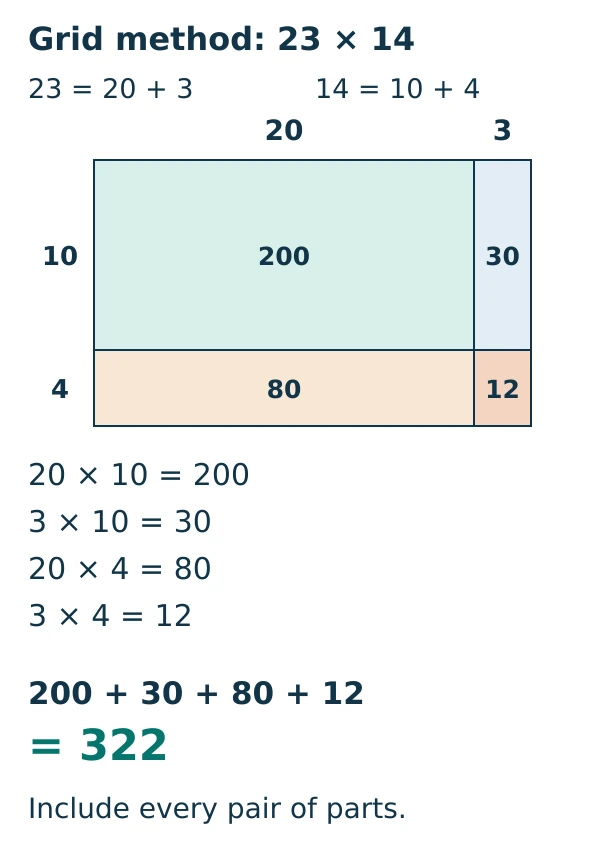
A times-table grid stores facts. The grid method, also called the box method, uses a small table of partial products to calculate a larger multiplication. Split each factor by place value, multiply every row part by every column part, then add all the partial products. This works because multiplication distributes over addition.
Example 4: 23 × 14
- Partition: 23 = 20 + 3 and 14 = 10 + 4.
- Multiply all four pairs: 20 × 10 = 200; 3 × 10 = 30; 20 × 4 = 80; 3 × 4 = 12.
- Add: 200 + 30 + 80 + 12 = 322.
Check a different way: 23 × 14 = 23 × (7 × 2) = 161 × 2 = 322. Multiplying only 20 × 10 and 3 × 4 misses the two cross-products, 30 and 80.
Example 5: 36 × 7
Split 36 into 30 + 6: (30 × 7) + (6 × 7) = 210 + 42 = 252. The 3 in 36 represents 30, so that part is 210, not 21. Check: 35 × 7 + 7 = 245 + 7 = 252.
Example 6: equal groups in a word problem
A class puts 8 pencils into each of 6 pots. There are 6 × 8 = 48 pencils. If all 48 pencils are shared equally among 8 pots instead, each pot gets 48 ÷ 8 = 6 pencils. Keep the units with your answer and identify whether you need a total or a group size.
Choose a useful practice routine
- Complete: locate a fact, cover it, and explain a way to derive it.
- Helper: select a product to see the equation, equal groups and, for more than five groups, a split into five groups and the remainder.
- Practice: exactly half the answer cells are hidden: 50 in a 10 × 10 grid or 72 in a 12 × 12 grid. Reset makes a new random selection.
- Blank: fill the facts you know first, then use symmetry, doubles or adjacent facts for the others. Check Answers gives a current count, so checking repeatedly does not add points.
Work on a few uncertain facts at a time. Explain the strategy before trying to recall the answer without the grid. Speed can be practised after accuracy and understanding are secure; a whole-grid time on its own does not show which facts need help.
Curriculum note: England’s Year 4 programme includes recall of multiplication and division facts up to 12 × 12. This is an England-specific statement; expectations elsewhere may differ. This page is a practice resource, not an official test or a prediction of test performance.
Common mistakes and how to fix them
- Adding the headers: row 7, column 9 is 7 × 9 = 63, not 7 + 9 = 16.
- Landing one cell away: keep the row fixed and check the top label. In row 7, column 8 is 56 and column 9 is 63.
- Confusing squares with doubling: 8² means 8 × 8 = 64; doubling 8 means 2 × 8 = 16.
- Dropping place value: split 23 into 20 + 3, not 2 + 3.
- Omitting partial products: a two-part factor times another two-part factor requires all four pairings.
- Assuming every division answer appears: 50 ÷ 6 is not an exact whole-number fact in this grid. Since 6 × 8 = 48, it is 8 remainder 2 (or 8⅓).
Practice questions with explained answers
Try these before opening the answers. Use a grid for the first attempt, then explain a strategy without it.
1. Find row 8, column 9.
72. Use 8 × 10 − 8 = 80 − 8 = 72.
2. Complete 7 × □ = 56.
8. The 56 in row 7 sits under column 8; 7 × 8 = 56.
3. Calculate 63 ÷ 9.
7, because 9 × 7 = 63.
4. Use 6 × 7 = 42 to find 6 × 8.
48. Add one more group of 6: 42 + 6 = 48.
5. Find 11 × 11.
121. It is a diagonal square-number fact.
6. Find 12 × 8 by splitting 12.
96. (10 × 8) + (2 × 8) = 80 + 16 = 96.
7. Calculate 24 × 13 with partial products.
312. (20 × 10) + (4 × 10) + (20 × 3) + (4 × 3) = 200 + 40 + 60 + 12 = 312.
8. Calculate 47 × 6.
282. (40 × 6) + (7 × 6) = 240 + 42 = 282.
9. Nine boxes each hold eight crayons. How many crayons?
72 crayons. There are 9 equal groups of 8, so 9 × 8 = 72.
10. A learner says 7 × 8 = 7 × 5 + 3. What went wrong?
The extra 3 also needs multiplying by 7. Correct: 7 × (5 + 3) = 35 + 21 = 56.
11. Is 0 × 12 equal to 12?
No. Zero groups of 12 contain 0 items. It is 1 × 12 that equals 12.
12. Explain why 36 appears more than once.
Different factor pairs can have the same product. In this grid, 3 × 12, 4 × 9, 6 × 6, 9 × 4 and 12 × 3 all equal 36.
Frequently asked questions
What is the difference between a multiplication grid and a multiplication square?
Both names commonly mean the same row-and-column times-table chart. Check the header range: a “12 × 12” grid here means factors 1 to 12, excluding the header row and column from the count of 144 products.
Can I type into the blank grid?
Yes. Choose Blank Grid or Practice Mode. Type whole-number digits, then press Enter, move out of the cell, or select Check Answers. A tick means correct; a cross means the answer needs review. Erasing an answer clears its old feedback. Decimal text or letters are rejected rather than silently shortened.
Can I print a blank multiplication grid?
Choose the size, choose Blank Grid, then select Print Grid. Practice Mode prints its partly filled version; Complete Grid prints the answer grid. Check the print preview before saving or printing. The linked printable times-table pack above is another option.
Does using a grid replace learning the facts?
A grid can help you notice relationships and check work. Build towards recalling and explaining facts without looking, using equal groups, arrays and related facts when you get stuck.
Sources & References
The explanations, examples, interactive tool and diagrams on this page are original. These primary teaching references support the curriculum context and the properties used above.
- Department for Education: National curriculum in England, mathematics programmes of study — Year 4 multiplication and division expectations.
- NCETM: Connecting multiplication and division, and the distributive law — commutativity, related facts and partitioning.
- NCETM: Multiplication — arrays and progression to the grid and column methods.