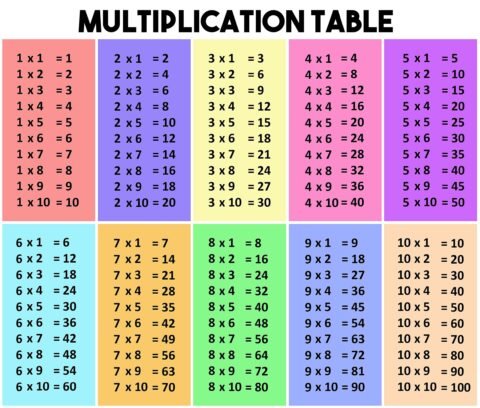
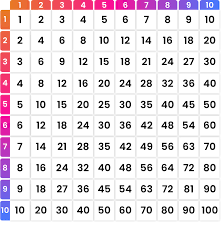
Advanced Multiplication Table Generator Create customized multiplication tables with advanced formatting options Basic Settings Appearance Advanced Help Start Number ? End Number ? Table Title ? Orientation ? Horizontal Vertical
Advanced Interactive Geodesic Bearing Calculator How to Use: Enter Coordinates: Input the Latitude and Longitude (in decimal degrees) for Point 1 (Origin) and Point 2 (Destination). Latitude values: -90 to
Advanced Interactive Compass How to Use: Enable Compass: If prompted, or if the compass doesn't start, click the "Enable Compass / Request Permissions" button. This is required on many mobile
Times Table Generator Create customized multiplication worksheets Start Table End Table Problems Per Table Show Answers No Yes Generate Worksheet Print Worksheet Copy to Clipboard Your Worksheet Multiplication is a