Understand your heading
Compare magnetic and true headings, measure a spherical bearing between coordinates, and explore the angle mathematics. Use manual mode on any device; optional sensor readings require a supported browser and a known north reference.
For learning and rough demonstrations only. This is not a certified compass or a tool for flight, marine, emergency or other safety-critical navigation. Default coordinates and zero declination are examples, not your location or a current local magnetic model.
1. Compass and location inputs
Negative and multi-turn angles wrap into 0°–360°. This manual input always means magnetic heading.
East positive, west negative. True heading = magnetic heading + declination.
Keep Auto if unsure. The absolute flag does not reliably establish the north reference across browser implementations. Relative orientation is never accepted as a compass. Keep the device flat in its natural portrait orientation, top edge away from you.
Your coordinates
Kilometres; must be positive. The default 6,371.0088 km is a mean-radius spherical approximation, not a terrain or road model.
Target / Destination Bearing
2. Heading and target result
Showing magnetic heading from manual input. Start live compass on a supported mobile device for sensor data.
3. Detailed Compass Calculations
| Measurement | Meaning | Current Result |
|---|---|---|
| Enable JavaScript to calculate; the lesson and worked examples remain available below. | ||
Understand digital compass headings and bearings
A compass angle answers a question about direction. Before using the number, ask two things: which direction is being measured, and which north is zero? A heading of 090° means east of the chosen north reference. It does not, by itself, tell you where you are, how far away a destination is, or whether a route is safe.
Educational use only: use this tool to explore angles, coordinate geometry, and sensor behavior. A browser reading can be unavailable, stale, or inaccurate. Do not use it as the sole basis for hiking, marine, aviation, emergency, or other safety-critical navigation.
Heading, bearing, and direction of travel are different
- Device heading
- The direction in which the device's reference edge points. For the flat, portrait phone setup used here, use the top edge. You can turn the phone without moving to another place.
- Bearing to a target
- The direction from a starting position toward a destination. The coordinate calculation gives an initial great-circle bearing measured from geographic, or true, north.
- Course over ground
- The direction of actual movement across the ground. A device can point one way while you move another way. A geolocation heading, when supplied, describes movement, rather than the way you hold the phone.
Compass bearings increase clockwise: north is 000°, east 090°, south 180°, and west 270°. Three-digit notation makes a small bearing unambiguous: 007° means seven degrees clockwise from north. North can also be written 360° in some conventions; this calculator wraps a full turn back to 0°.
A reliable order for a classroom calculation
- Begin in manual mode. Enter a heading and check its north reference. A typed example does not need a phone sensor or your current location.
- Set declination deliberately. Use an appropriate value for the location and date when converting magnetic and true directions. A default of 0° is an assumption, not a measurement.
- Enter both coordinate pairs for a target. Latitude runs from −90° to +90°; longitude from −180° to +180°. North and east are positive; south and west are negative. A blank coordinate is not the same as zero.
- Compare like with like. Convert the device heading and target bearing to the same north reference before calculating a turn.
- Read the status as well as the angle. A manual value, a valid live value, and an unavailable sensor are different states. More decimal places cannot turn an uncertain measurement into an accurate one.
Magnetic north, true north, and declination
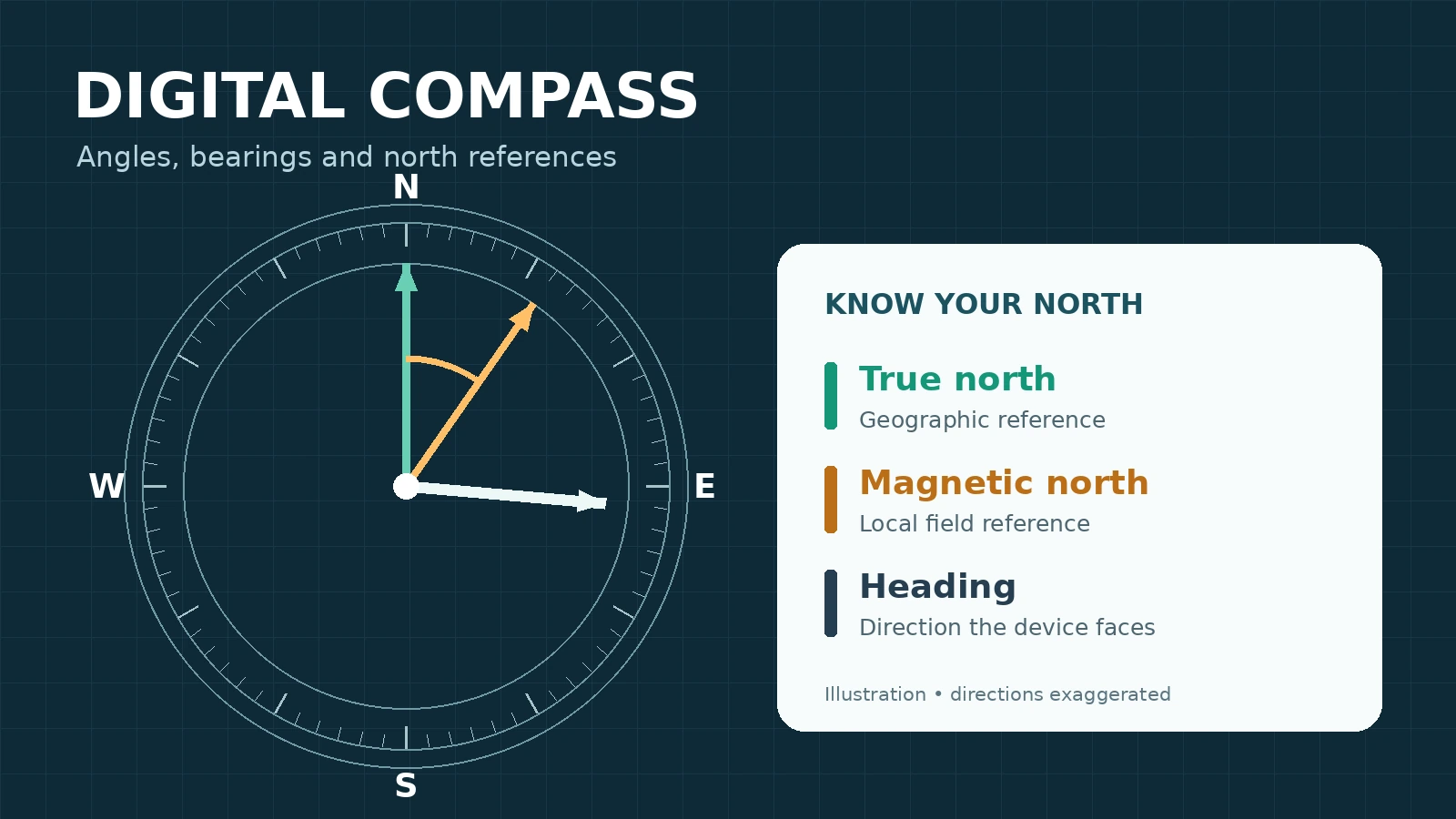
True north follows the local meridian toward the geographic North Pole. Magnetic north is the direction of the local horizontal magnetic field. A magnetic compass does not simply point along a straight line to one fixed magnetic-pole location.
The angle between these references is magnetic declination, written D. Use east-positive and west-negative values. Declination changes with location and time; obtain a current, location-specific value from an authoritative model such as NOAA's. A regional model does not correct interference from a nearby magnet or steel structure.
True heading = wrap(magnetic heading + D)
Magnetic heading = wrap(true heading − D)
Here, wrap means add or subtract whole turns until the result is at least 0° and less than 360°. One definition that works for positive and negative inputs is wrap(x) = x − 360 × floor(x ÷ 360), where floor rounds down to the next integer. In programming languages where the remainder operator can return a negative result, a positive-wrap implementation is ((x % 360) + 360) % 360.
If a source already supplies a true heading, do not add declination again. To show its magnetic equivalent, subtract D instead. Also remember that grid north on a projected map can differ from true north; this page does not calculate a map's grid convergence.

What a browser compass can and cannot establish
Live orientation requires suitable hardware, browser support, a secure context, and any required permissions. Where the browser offers an orientation permission request, it must be started by a user action such as a button tap. Location permission is separate: obtaining coordinates does not establish the phone's facing direction.
Relative orientation is not a north reference. A relative alpha angle measures rotation from an arbitrary starting frame. Subtracting it from 360° cannot turn it into a trustworthy compass reading. The tool must keep a manual fallback when north-referenced data is unavailable.
“Absolute” does not automatically mean true north. Current W3C orientation documentation describes an Earth-referenced frame tied to magnetic north, while older descriptions and implementations differ. The absolute flag alone should not be used to label a reading as true. Apple's WebKit compass-heading path uses a magnetic heading. For other absolute-alpha data, use the sensor-reference setting only when you have verified the reference for that device and browser; a manually selected reference remains an assumption.
For a simple alpha-based heading, hold the phone flat with the screen facing up and in portrait orientation. The formula wrap(360° − alpha) is not a general tilt-compensation algorithm. Rotating the screen or holding the phone upright changes how its axes relate to the direction you intend to measure. Follow the status guidance, move away from magnetic interference, and use manual examples if live readings are unreliable.
This page accepts live readings only in the screen's primary portrait orientation at 0° screen rotation, with both reported tilt angles within ±15° of level. It also rejects Apple's compass readings when the reported uncertainty is missing, negative, or greater than 30°. These are the tool's screening thresholds, not a manufacturer accuracy guarantee. The Start Live Compass button becomes Stop Live Compass while the sensor is running.
From a heading to a 16-point direction
The four main directions divide a circle into quarters. A 16-point compass divides it into sectors of 360° ÷ 16 = 22.5°. Each direction name covers 11.25° on either side of its center. In clockwise order, the labels are N, NNE, NE, ENE, E, ESE, SE, SSE, S, SSW, SW, WSW, W, WNW, NW, and NNW.
For a wrapped heading H, the sector index is floor((H + 11.25°) ÷ 22.5°) modulo 16. Index 0 is N. This convention assigns an exact halfway boundary to the next clockwise sector. Use the unrounded heading to choose the label; round only the number shown on screen.
Initial bearing and spherical distance
Let φ₁ and λ₁ be the start latitude and longitude, and φ₂ and λ₂ the destination. Convert degrees to radians by multiplying by π ÷ 180 before using the trigonometric functions. Define Δφ = φ₂ − φ₁ and Δλ = λ₂ − λ₁.
y = sin(Δλ) × cos(φ₂)
x = cos(φ₁) × sin(φ₂) − sin(φ₁) × cos(φ₂) × cos(Δλ)
Initial true bearing B = wrap(atan2(y, x) × 180 ÷ π)
The two-input atan2 function retains the quadrant of the direction; ordinary atan(y ÷ x) can lose it. This is an initial bearing: a great-circle route usually changes bearing as it crosses the globe. Keeping one compass bearing continuously follows a different kind of path, except in special cases.
The haversine calculation finds the central angle c and then converts that angle to arc length using the selected positive Earth radius R:
a = sin²(Δφ ÷ 2) + cos(φ₁) × cos(φ₂) × sin²(Δλ ÷ 2)
c = 2 × atan2(√a, √(1 − a))
Distance d = R × c
Use radians for c, and the distance inherits R's unit. R = 6,371 km is a convenient spherical classroom model. Real Earth is not a perfect sphere. This distance excludes terrain, roads, obstacles, altitude changes, and route restrictions; it is not a walking or flight-planning distance.
At coincident coordinates there is no direction to a distinct target. At exactly antipodal points on a sphere there are infinitely many equally short great-circle routes, so there is no unique initial bearing. Near either case, small coordinate changes can strongly affect the angle. At a starting geographic pole, the ordinary local north reference is undefined, so this tool withholds the bearing. An unavailable bearing is more honest than a fabricated 0°.
The shortest turn uses matching north references
Let B be the target bearing and H the current heading, both magnetic or both true. Define turn = wrap(B − H + 180°) − 180°. Positive means clockwise/right; negative means counterclockwise/left. The result lies from −180° inclusive to +180° exclusive. For an exact half-turn, either direction is equally short even if the formula returns −180°.

Six worked examples
1. Wrap a negative heading, then apply east declination
Given: magnetic heading −725° and declination 8° east.
- Add three complete turns: −725° + 3 × 360° = 355°.
- East declination is positive, so the true heading is 355° + 8° = 363°.
- Remove one turn: 363° − 360° = 003° true.
The result crosses north. The correction does not mean “stop at 360°”; a circle has no hard endpoint.
2. Use west declination and reverse the conversion
Given: magnetic heading 104.2° and declination 7.5° west, so D = −7.5°.
True heading = 104.2° + (−7.5°) = 96.7°. To check the inverse, magnetic heading = 96.7° − (−7.5°) = 104.2°.
Subtracting a negative number adds its magnitude. Writing D with its sign is safer than memorizing an “always add” rule without naming the conversion direction.
3. Find the short turn across north
Given: true heading H = 10° and target true bearing B = 350°.
Turn = wrap(350° − 10° + 180°) − 180° = wrap(520°) − 180° = 160° − 180° = −20°, or 20° left.
In the reverse situation, H = 350° and B = 10°, the answer is 20° right. If H = 10° and B = 190°, the difference is exactly 180°: left and right are equally short. A −180° output is a tie convention, not evidence that left is better.
4. Check a cardinal-sector boundary
The N sector covers 348.75° ≤ H < 360° and 0° ≤ H < 11.25°. NNE covers 11.25° ≤ H < 33.75°.
Thus 11.249° is N, but exactly 11.25° is NNE. Likewise, 348.749° is NNW, but exactly 348.75° is N. At H = 11.25°, the index is floor(22.5 ÷ 22.5) = 1, which selects NNE.
At one decimal place, 11.249° displays as 11.2°. A rounded display close to a boundary can conceal the original value, so classify before rounding.
5. Compare an ordinary target with its antipode
Ordinary case: start at (0°, 0°), target (0°, 1°), and use R = 6,371 km. Both points are on the equator. The shorter route goes east, so the initial bearing is 090° true. Its central angle is 1° = π ÷ 180 radians, giving d = 6,371 × π ÷ 180 ≈ 111.195 km.
Antipodal case: change the target to (0°, 180°). The distance is half a circumference: d = 6,371π ≈ 20,015.087 km. Eastward and westward equatorial routes are equally short, as are other great-circle semicircles. Therefore the initial bearing is not uniquely defined. Tiny floating-point remnants in sin(π) must not be mistaken for a genuine preferred direction.
6. Convert decimal degrees to DMS without a rounding error
Given: latitude 51.5074°. Take 51 whole degrees. Multiply the remainder by 60: 0.5074 × 60 = 30.444 minutes. Take 30 whole minutes, then 0.444 × 60 = 26.64 seconds. The result is 51° 30′ 26.64″ N.
For longitude −73.9999999°, the unrounded magnitude is 73° 59′ 59.99964″. To two decimal places, the seconds become 60.00″. Carry one minute, then carry the resulting 60 minutes: the normalized result is 74° 00′ 00.00″ W, not 73° 59′ 60.00″ W.
A robust approach rounds the total arcseconds first, then splits them into degrees, minutes, and seconds. Keep the hemisphere from the original coordinate. DMS minutes and seconds are angular units: 1° = 60′ = 3,600″.
Practice: try these eight questions
Work out each answer before opening the explanation. Use the east-positive declination convention and the 16-point boundary convention above.
Normalize −450° into the range 0° ≤ H < 360°. Which main direction is it?
Show answer and reasoning
270°, west. Add 720°, or two complete turns: −450° + 720° = 270°. Adding only one turn would leave −90°, which is outside the chosen range.
A magnetic heading is 359° and declination is 4° east. What is the true heading?
Show answer and reasoning
003° true. D = +4°, so 359° + 4° = 363°. Wrap by subtracting 360°. The magnetic and true angles describe the same physical direction using different zeros.
A true heading is 2° and declination is 6° west. What magnetic heading represents it?
Show answer and reasoning
008° magnetic. Use magnetic = true − D. Since D = −6°, the calculation is 2° − (−6°) = 8°.
Your true heading is 278° and the target true bearing is 5°. What is the shortest turn?
Show answer and reasoning
87° right. Turning clockwise from 278° to 360° takes 82°, then another 5° reaches the target. Turning left would take 273°.
Using 16 directions, classify 33.749° and exactly 33.75°. Why can rounded numbers be misleading?
Show answer and reasoning
33.749° is NNE; 33.75° is NE. The exact halfway point goes to the next clockwise sector. Both values round to 33.75° at two decimal places, so the displayed number alone may hide which side of the boundary the original value occupies.
From (0°, 0°) to (0°, −1°), what are the initial bearing and spherical distance when R = 6,371 km?
Show answer and reasoning
270° true and approximately 111.195 km. Negative longitude puts the target one degree west along the equator. Reversing east to west changes the bearing, not the one-degree arc length.
Convert latitude 40.7128° to degrees, minutes, and seconds.
Show answer and reasoning
40° 42′ 46.08″ N. The fractional degrees give 0.7128 × 60 = 42.768 minutes. The fractional minutes give 0.768 × 60 = 46.08 seconds. Positive latitude means north.
A phone reports alpha = 90° with relative orientation only. Can you conclude that the phone points west? Does location permission fix this?
Show answer and reasoning
No to both. Relative alpha has an arbitrary starting reference, so wrap(360° − 90°) = 270° is only a rotation in that frame. Coordinates locate the phone; they do not establish its facing direction. Use verified north-referenced orientation data or manual mode.
Common mistakes and questions
Why does a compass number change when I stay in the same place?
You can rotate the device without changing its coordinates. Small fluctuations can also come from sensor noise or magnetic interference. Smoothing reduces visible jitter but can delay the display, and it cannot remove a systematic north-reference error.
Should I add declination to every live reading?
No. Add D when converting a magnetic heading to true. If the input is already true, adding D again introduces an error. Check the declared input reference and treat an assumed sensor reference as uncertain.
Why can a live sensor be unavailable after I allow permission?
Permission permits access; it does not create a magnetometer, require every browser to expose compass data, or guarantee a fresh valid reading. A browser may provide only relative orientation or no usable values. Continue with manual mode rather than treating a missing heading as north.
Does using location always mean the coordinates came from GPS?
No. Browser geolocation asks the device for a position, and the device may use different positioning sources. The API's location result and any reported accuracy are distinct from compass accuracy. Entering known coordinates is sufficient for the mathematical target calculation.
Is a zero-distance target due north?
No. If start and destination coincide, there is no unique direction to another point. Similarly, an exact spherical antipode has a well-defined distance but no unique initial bearing. A blank or explanatory result is appropriate for those cases.
Can the initial target bearing replace route instructions?
No. It describes a geometric direction at the starting point. It does not check access, terrain, crossings, weather, obstacles, or changing bearings along the route. Even a perfectly calculated number is not a safety assessment.
Is 359° far away from 1°?
They differ by only 2° around the short arc through north. Ordinary arithmetic gives their average as 180°, which is wrong for two equally weighted directions clustered around north. Circular averaging instead works with sine and cosine components; exactly opposite directions have no unique mean direction.
For another application of clockwise-from-north angles, explore the Sun Position Calculator and compare solar azimuth with elevation. To see why great-circle distance is only one ingredient in a larger model, use the Aircraft Range Calculator as an educational exercise, not an operational flight-planning tool.
Sources & References
Technical references checked on October 4, 2026. Browser support and specifications can change. The examples above use stated mathematical assumptions; they are not measurements of a particular device or a live declination forecast.
- MDN: DeviceOrientationEvent — orientation properties, secure-context requirements, and nonstandard WebKit compass properties.
- MDN: requesting orientation permission — user activation, permission results, and compatibility limits.
- MDN: Geolocation.getCurrentPosition() — separate location permission and position retrieval.
- NOAA NCEI: Magnetic Declination — official magnetic-declination background and resources.
- NOAA: magnetic declination and bearing correction — east-positive convention, location/date dependence, and true = magnetic + declination.
- W3C: Device Orientation and Motion — relative versus absolute orientation, device axes, and the flat-device compass example.
- W3C: AbsoluteOrientationSensor model — magnetic-north Earth frame in the working draft; draft status and implementation differences matter.
- WebKit: iOS motion and compass implementation — implementation evidence that the compass-heading path uses magneticHeading; this is source code, not a guarantee for every browser/device combination.
- MDN: geolocation heading — direction of travel relative to true north, distinct from device orientation.
- GeographicLib: multiple shortest geodesics — coincident-point and spherical-antipode ambiguity.