
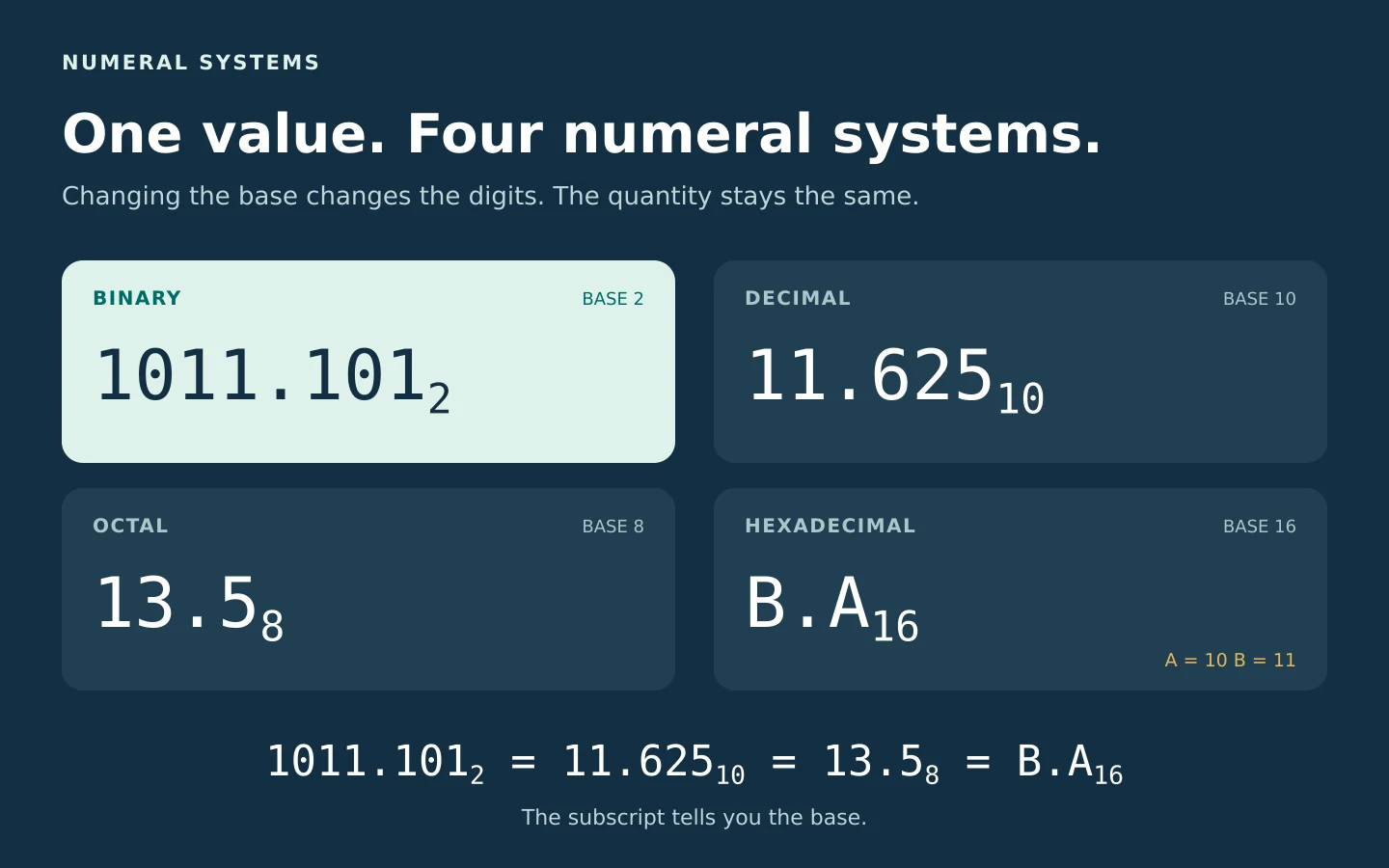
Convert the notation, keep the value
Convert signed integers and fractions between binary, decimal, octal, hexadecimal and any whole-number base from 2 to 36. See exact rational values, place-value steps and clearly labeled truncated results.
Convert a Number
Result
| Output | Value | Meaning |
|---|---|---|
| Enable JavaScript to calculate. The worked lesson remains available below. | ||
Batch Converter
Enter one number per line. The batch tool uses the same base, fraction-digit and display settings above. Maximum 100 lines; each result states whether it is exact.
Conversion Steps
Read digits in the input base → retain an exact fraction → generate digits in the target base → label any unfinished expansion.
How number bases describe the same value
A numeral is a written representation of a number. Changing its base changes the digits, not the quantity. The subscript names the base: 102 means two, 108 means eight, and 1016 means sixteen. Read a binary numeral such as 1011 as “one zero one one, base two” when there is any risk of confusion.
In base b, the allowed digit values run from 0 to b − 1. Starting immediately left of the point, the positions are b0, b1, b2, and so on. Immediately right of the point they are b−1, b−2, b−3. A zero digit contributes zero while keeping the other digits in their correct positions.
Value = … + d2b2 + d1b + d0 + d−1/b + d−2/b2 + …
Each d is a digit’s numerical value. For a negative numeral, put a minus sign around the whole positive expansion. This is the same place-value idea used in our place value calculator and expanded form examples.
| System | Base | Digit values | Example |
|---|---|---|---|
| Binary | 2 | 0, 1 | 10112 = 1110 |
| Ternary | 3 | 0, 1, 2 | 1023 = 1110 |
| Quaternary | 4 | 0–3 | 234 = 1110 |
| Octal | 8 | 0–7 | 138 = 1110 |
| Decimal | 10 | 0–9 | 1110 |
| Duodecimal | 12 | 0–9, A, B | B12 = 1110 |
| Hexadecimal | 16 | 0–9, A–F | B16 = 1110 |
| Base 36 | 36 | 0–9, A–Z | Z36 = 3510 |
The letter choices above are this converter’s convention. A = 10, B = 11, continuing to Z = 35. Ordinary ternary uses 0, 1 and 2; balanced ternary uses a different signed digit set and is not this tool’s base-3 mode.
Seven worked conversions
1. Binary with a fractional part: 1011.101₂
Keep the point fixed and label the weights. The integer part contributes 8 + 0 + 2 + 1 = 11. The fractional part contributes 1/2 + 0/4 + 1/8 = 5/8 = 0.625. Therefore 1011.1012 = 11.62510 exactly. The shorter 101.1012 is 5.625, because its leftmost 1 occupies the fours position rather than the eights position.

2. Decimal to binary: 45₁₀
Divide by 2, recording the remainder each time: 45 gives quotient 22, remainder 1; 22 gives 11, remainder 0; 11 gives 5, remainder 1; 5 gives 2, remainder 1; 2 gives 1, remainder 0; 1 gives 0, remainder 1. Stop when the quotient is zero.
Read those remainders from the last division upward: 101101₂. Check by expanding: 32 + 8 + 4 + 1 = 45. The first remainder belongs to the ones position, which is why reading the list downward gives the wrong order. For the ordinary quotient-and-remainder method, see our long division calculator.

3. Hexadecimal in both directions
For 25510, 255 ÷ 16 = 15 remainder 15, then 15 ÷ 16 = 0 remainder 15. Both remainder values are F, so the answer is FF16. In the other direction, 7A16 = 7 × 16 + 10 = 12210. Similarly, 2F16 = 2 × 16 + 15 = 4710. A hexadecimal letter is one digit, not a variable to solve for.
4. Octal fractions: 13.5₈
The 5 after the point means five eighths, not five tenths: 13.58 = 1 × 8 + 3 + 5/8 = 11.62510. It is the same value as Example 1. The position after the point always divides by the base.
5. Decimal fractions: 0.625 and 0.1
To convert 0.62510 to binary, multiply the remaining fraction by 2. First 0.625 × 2 = 1.25: write 1, retain 0.25. Next 0.25 × 2 = 0.5: write 0, retain 0.5. Finally 0.5 × 2 = 1: write 1, with no fraction left. Read these digits in their original order: 0.1012.
For 0.110 the process does not terminate: 0.0001100110011…2. At eight fractional digits this tool displays 0.00011001… and labels it approximate. That finite prefix equals 25/256 = 0.09765625, so it is not exactly 0.1. The omitted difference is 0.00234375. More digits reduce truncation error; they do not make a repeating expansion terminate.
6. A negative value: −101.01₂
Expand the magnitude first: 1 × 4 + 0 × 2 + 1 × 1 + 0 × 1/2 + 1 × 1/4 = 5.25. Apply the sign to the whole sum: −(4 + 0 + 1 + 0 + 0.25) = −5.25. Writing −4 + 0 + 1 + 0 + 0.25 would instead give −2.75.
This tool uses a leading minus sign. It does not interpret a fixed-width two’s-complement bit pattern. Thus 111111112 converts to 255, whereas an explicitly specified 8-bit two’s-complement interpretation would mean −1. Neither bit width nor signed machine encoding is implied by a bare binary string.
7. Custom bases and large integers
Select custom base 3 for 102.1: 1 × 9 + 0 × 3 + 2 + 1/3 = 34/3 = 11.333…10. The exact rational row retains 34/3 even when the decimal display stops. For a large integer, 900719925474099310 = 2000000000000116. The integer is retained exactly instead of being rounded through ordinary floating-point arithmetic.
Binary, octal and hexadecimal shortcuts
Because 16 = 24, one hexadecimal digit corresponds to four binary digits. A716 becomes 1010 01112. Keep all four bits in an internal group: 1016 is 0001 00002, which can be shortened to 100002 only by removing leading zeros from the entire numeral.
Because 8 = 23, one octal digit corresponds to three bits. Group outward from the point: 1011.1012 becomes 001 011 . 101, hence 13.58. Padding on the far left of the integer part or far right of the fractional part does not change the value. Padding at the wrong side of the point does.
An octal permissions example is 7558 = 111 101 1012 = 49310. Each three-bit group encodes separate read/write/execute flags; 7 = 4 + 2 + 1 and 5 = 4 + 1. This illustrates the number system, not a recommendation to change permissions on a file.
A quick conversion chart
| Decimal | Binary | Octal | Hex |
|---|---|---|---|
| 0 | 0000 | 0 | 0 |
| 1 | 0001 | 1 | 1 |
| 2 | 0010 | 2 | 2 |
| 3 | 0011 | 3 | 3 |
| 4 | 0100 | 4 | 4 |
| 5 | 0101 | 5 | 5 |
| 6 | 0110 | 6 | 6 |
| 7 | 0111 | 7 | 7 |
| 8 | 1000 | 10 | 8 |
| 9 | 1001 | 11 | 9 |
| 10 | 1010 | 12 | A |
| 11 | 1011 | 13 | B |
| 12 | 1100 | 14 | C |
| 13 | 1101 | 15 | D |
| 14 | 1110 | 16 | E |
| 15 | 1111 | 17 | F |
| 16 | 10000 | 20 | 10 |
Use this chart one digit at a time for binary–hexadecimal grouping. It does not mean that a multi-digit decimal numeral can be converted by translating each decimal digit separately.
Exact values, truncation and input rules
The calculator stores the entered value as a signed integer numerator over a positive integer denominator using BigInt arithmetic. If the input has m fractional digits in base b, the initial denominator is bm. The fraction is reduced before conversion. Decimal is a convenient way to label that fraction, not a floating-point intermediate.
A reduced fraction p/q has a terminating expansion in base b exactly when q divides some power of b. Equivalently, every prime factor of q must also divide b. Thus 1/8 terminates in bases 2 and 10; 1/10 repeats in base 2 because its denominator contains a factor 5. A finite input may still need more than the chosen number of output digits, so an ellipsis means “more digits remain,” not necessarily “this fraction repeats forever.”
Output is truncated toward zero, never rounded. At k fractional digits in target base b, the absolute truncation error is less than b−k. Negative tiny values may display −0.0000…; the sign and approximation label preserve the fact that the actual value is negative. The rational row remains exact. Swap is enabled only for an exact result within the 512-digit input limit, preventing a truncated result from silently replacing the original value.
- Choose whole-number bases from 2 through 36. Blank, fractional and out-of-range custom bases are errors.
- Use at most 512 digits per number. A batch accepts at most 100 lines and 60,000 characters. Blank lines remain blank.
- Use a point for fractions, not a comma. Spaces or single underscores may separate digit groups; do not put separators beside a sign or point. Subscripts and scientific-notation syntax are not input formats.
- Letters are case-insensitive. A letter E is digit value 14 in a sufficiently large base; it is not an exponent marker here.
- Prefixes 0b, 0o and 0x are recognized only in selected bases 2, 8 and 16 respectively. Otherwise their characters are read as ordinary digits if valid: 0B in base 16 is 11, and 0X in base 36 is 33. A mismatched prefix is never used to guess a new base.
- Changing settings or batch input clears stale batch results. Copy includes an approximation label where needed; Reset restores the original example and sample batch.
For scientific notation rather than numeral bases, use our scientific notation lesson. The two kinds of notation solve different tasks.
Practice, then reveal the reasoning
Write the base beside every answer. Try the place-value or remainder method before using the converter to check.
1. Convert 11010₂ to decimal
16 + 8 + 0 + 2 + 0 = 26₁₀.
2. Convert 29₁₀ to binary
29 = 16 + 8 + 4 + 1, so the bits are 11101₂. Repeated division gives remainders 1, 0, 1, 1, 1; reverse them.
3. Convert 2F₁₆ to decimal
F = 15. Therefore 2 × 16 + 15 = 47₁₀.
4. Convert 64₁₀ to octal
64 = 1 × 8² + 0 × 8 + 0, so the answer is 100₈.
5. Convert 0.11₂ to decimal
1/2 + 1/4 = 3/4 = 0.75₁₀. It does not mean eleven hundredths.
6. Convert −A.8₁₆ to decimal
−(10 + 8/16) = −10.5₁₀. The sign applies to both parts.
7. Convert 212₃ to decimal
2 × 9 + 1 × 3 + 2 = 23₁₀.
8. Convert 1Z₃₆ to decimal
Z = 35, so 1 × 36 + 35 = 71₁₀.
9. Is 128 a valid octal numeral?
No. The digit 8 is not allowed in base 8. Do not remove the invalid digit or reinterpret the number automatically.
10. Does 0.1₃ terminate in decimal?
0.1₃ = 1/3, so no: it is 0.333…₁₀. The denominator has a factor 3, which is not a factor of 10.
11. Convert F.8₁₆ directly to binary
F gives 1111 and 8 gives 1000. Thus 1111.1000₂ = 1111.1₂. Removing trailing fractional zeros is safe.
12. Is 0.0001₂ exactly 0.1₁₀?
No. 0.0001₂ = 1/16 = 0.0625₁₀. It is only the first four fractional bits of the repeating binary expansion of 0.1₁₀.
Questions about the converter
Why can’t I use 2 in binary or 8 in octal?
A base-b digit must be smaller than b. At the base’s value, carry to the next place: two is 10₂ and eight is 10₈.
Why do some results have more digits?
Smaller bases need more positions to represent the same large quantity. For example, 255₁₀ is FF₁₆ but 11111111₂. More written digits do not imply a larger value.
What are binary and hexadecimal used for?
Binary describes bit patterns. Hexadecimal compresses four bits into one digit and is commonly used for byte values and memory representations. A numeral alone does not tell you whether those bits encode an integer, text, a color or something else.
Does the converter need JavaScript?
Interactive conversion and copying require JavaScript and BigInt support. The explanations, tables and practice answers are ordinary page content and remain readable without running the calculator.
Sources & References
Background sources checked October 4, 2026. Worked examples, practice questions and diagrams above were independently calculated for this lesson.
- OpenStax: Converting with Base Systems — positional notation and repeated division.
- Cornell CS 3410: Numbers — bases, conversion and signed interpretation.
- NC State E 115: Binary and Hexadecimal — place values and hexadecimal bit groups.
- OpenStax: Machine-Level Information Representation — fractional binary numbers and representation context.
- MDN: BigInt — exact integer arithmetic used by the tool.