
Distance Calculator
Find straight-line distance in 2D or 3D, calculate distance from speed and time, solve for speed or duration, or convert a length. Match the model and units before calculating.
Calculate Distance
Select a mode, enter the known values, and calculate distance, speed, time, coordinate length, midpoint, slope, and unit conversions.
What does a distance calculator measure?
Distance is a non-negative length. In coordinate geometry it is the straight-line separation of two points; in a journey it can mean the total length of the path travelled. These are different questions. A 3 km eastward walk followed by 4 km north covers 7 km, although the start and finish are only 5 km apart.
This calculator keeps five useful tasks together: 2D distance, 3D distance, distance from speed and time, solving for speed or time, and converting an already-known length. It shows intermediate calculations, midpoint and slope where appropriate. It does not look up roads, traffic or locations.
Choose a model before choosing a formula
A number is not a measurement until its unit and meaning are clear. Coordinates such as (1, 2) and (7, 10) give a separation of 10 coordinate units. They do not imply 10 meters. Leave the coordinate unit as “unit” for an abstract graph; select meters, feet or another length unit only if every axis genuinely uses that scale. Physical conversion cards stay blank when the scale is unspecified.
Flat coordinate formulas also assume perpendicular axes with the same scale. A diagram stretched horizontally does not change its coordinate distances. If the horizontal axis is in feet and the vertical axis is in meters, convert the data first. Latitude and longitude are angles on Earth, not interchangeable Cartesian lengths.
How to use the five modes
- 2D Points: enter both x- and y-coordinates, including minus signs. Choose the shared unit and display precision. Read distance, midpoint and slope separately.
- 3D Points: enter x, y and z for each point. Height must use the same length unit as the other axes.
- Speed × Time: enter a non-negative speed and duration, choose their units, and choose the distance unit you want. Use constant speed or an average speed for the exact interval.
- Solve Speed / Time: select the unknown first. Average speed needs total distance and positive elapsed time. Time needs distance and a positive constant speed. The output menu changes to the relevant units.
- Unit Converter: enter a non-negative length and select the source and target units. The physical length stays the same.
After changing an input, the old result is cleared so it cannot be mistaken for the new answer. Press Calculate, Solve or Enter to refresh it. Reset restores that mode’s demonstration values and precision. Empty inputs are errors, not automatic zeros.
Distance, midpoint and speed formulas
2D: d = √[(x₂ − x₁)² + (y₂ − y₁)²]
3D: d = √[(x₂ − x₁)² + (y₂ − y₁)² + (z₂ − z₁)²]
Midpoint: M = ((x₁ + x₂)/2, (y₁ + y₂)/2); average z as well in 3D
Slope: m = (y₂ − y₁)/(x₂ − x₁), provided x₂ ≠ x₁
Motion: distance = speed × time; average speed = total distance ÷ elapsed time; time = distance ÷ constant speed
Conversion: target value = source value × meters per source unit ÷ meters per target unit
The coordinate differences form perpendicular sides of a right triangle. Squaring and adding gives the square of its hypotenuse; the square root restores a length. Swapping the two endpoints reverses the differences but does not change the distance.
Coordinate distance, step by step
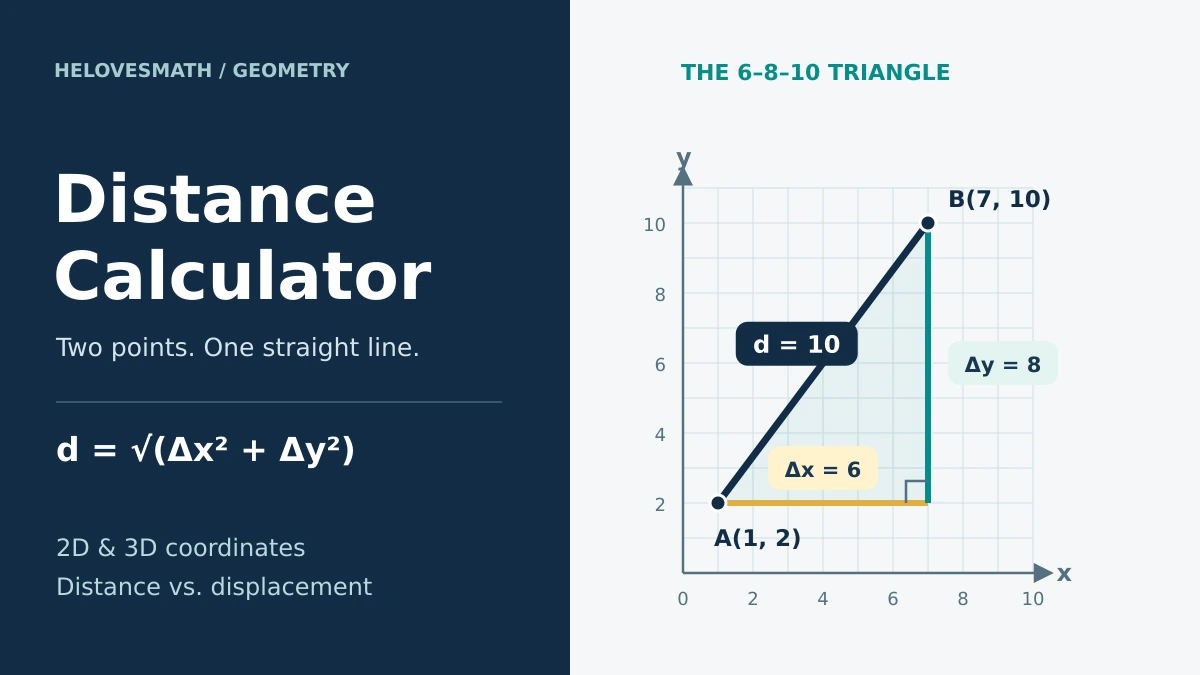
A 6–8–10 triangle in the plane
For A = (1, 2) and B = (7, 10), subtract corresponding coordinates: Δx = 7 − 1 = 6 and Δy = 10 − 2 = 8. Then d = √(6² + 8²) = √100 = 10 units. The midpoint is ((1 + 7)/2, (2 + 10)/2) = (4, 6). The slope is 8/6 = 4/3, approximately 1.333. These three results describe different features of the same segment.

A useful reasonableness check is max(|Δx|, |Δy|) ≤ d ≤ |Δx| + |Δy|. Here 8 ≤ 10 ≤ 14. This will catch many missing-square-root or subtraction mistakes, although passing the bound alone does not prove the answer.
Negative coordinates and special cases
From (−2, 5) to (4, −3), Δx = 6 and Δy = −8, giving √(36 + 64) = 10. Square the complete signed difference: (−8)² = 64. On a vertical line Δx = 0, so the distance is |Δy| and the slope is undefined. For identical points the distance is zero and the midpoint is that same point, but there is no unique line or slope through the pair.
Extend the triangle into 3D
From P = (0, 0, 0) to Q = (2, 3, 6), the displacement components are 2, 3 and 6. First the horizontal diagonal has squared length 2² + 3² = 13. Add the perpendicular height: d = √(13 + 6²) = √49 = 7 units. The midpoint is (1, 1.5, 3).

The calculator’s original 3D demonstration, (1, 2, 3) to (6, 8, 12), gives Δ = (5, 6, 9), so d = √142 ≈ 11.9164 units. This is a straight segment in space, not a journey constrained to floors, lifts or corridors.
Match speed and time units
Multiplying 60 mph by 2.5 hours gives 150 miles because the hour units cancel. Multiplying the same speed by 150 minutes without converting the duration would give the wrong number. Since 150 minutes = 2.5 hours, the correct distance is still 150 miles.
With changing speed, divide the journey into intervals or use its actual overall average. A simple arithmetic mean of speeds is generally wrong when the time spent at each speed differs. Include stationary time when the question asks for average speed over the whole journey.
Example: travel 60 km at 30 km/h, then 60 km at 60 km/h. The times are 2 h and 1 h, so the average is 120 km ÷ 3 h = 40 km/h, not 45 km/h. Equal distances do not mean equal travel times.
Zero cases: zero distance in a positive time has average speed zero. At a positive constant speed, the time corresponding to zero distance is zero. A positive distance at zero speed is impossible in this model, while zero distance at zero speed cannot determine a unique duration. No calculation should divide by zero.
Length conversion factors
These are exact definitions for the units used by the tool. An international foot is used, not the legacy U.S. survey foot. “Mile” means the international statute mile; a nautical mile is a separate unit.
| Unit | Symbol | Meters |
|---|---|---|
| Millimeter | mm | 0.001 |
| Centimeter | cm | 0.01 |
| Meter | m | 1 |
| Kilometer | km | 1000 |
| Inch | in | 0.0254 |
| Foot | ft | 0.3048 |
| Yard | yd | 0.9144 |
| Mile | mi | 1609.344 |
| Nautical mile | nmi | 1852 |
One knot is one nautical mile per hour, exactly 1852/3600 m/s. One hour is 3600 seconds; the calculator’s day is a duration of 24 hours, not a calendar date affected by daylight-saving changes.
For example, 10 km × 1000 m/km ÷ 1609.344 m/mi ≈ 6.21371 mi. Keep the full factor until the final rounding. If you only need conversions, the length converter provides a focused companion tool.
Distance travelled is not displacement
Imagine walking 3 km east and then 4 km north. The path length is 3 + 4 = 7 km. The displacement is the directed vector (3, 4) km, whose magnitude is √(3² + 4²) = 5 km. If the walk takes one hour, the average speed is 7 km/h; the magnitude of average velocity is 5 km/h.

A return to the starting point can have positive path distance but zero displacement. That is why entering only start and finish coordinates cannot recover the full distance travelled. Road routes need road-network information, while a distance across Earth needs a suitable geographic model. Do not enter latitude/longitude degrees as meters or use this flat-coordinate tool for surveying or navigation.
More worked examples
1. Find an average speed
A train covers 300 km in 4 h. Divide total distance by elapsed time: 300 ÷ 4 = 75 km/h. In meters per second this is 75 × 1000 ÷ 3600 ≈ 20.8333 m/s. This describes the average, not necessarily the speed at any particular moment.
2. Find travel time
A runner covers 10 km at a constant 12 km/h. Time = 10 ÷ 12 = 5/6 h. Multiply by 60 minutes per hour to get 50 minutes. The decimal 0.8333 hours is not 83.33 minutes. For another scale, 240 m ÷ 12 m/s = 20 seconds.
3. Convert a nautical speed
At 7.25 knots for 2.5 days, the duration is 60 hours. Distance = 7.25 × 60 = 435 nautical miles. Multiplying by the exact 1852 m per nautical mile gives 805,620 m. Using a prematurely rounded knot-to-m/s factor introduces avoidable error.
4. Use a physical coordinate scale
Suppose points (0, 0) and (3, 4) are measured in feet. Their separation is 5 ft. Multiply by 0.3048 to get 1.524 m. If those same numbers describe kilometers instead, the result is 5 km. Selecting a unit assigns the known scale; it does not discover it.
Common mistakes and quick checks
- Forgetting the square root: 6² + 8² = 100 is squared distance; the length is 10.
- Losing a minus sign: 4 − (−2) = 6, not 2. Subtract first, then square.
- Confusing slope with length: a vertical segment has a finite distance even though its slope is undefined.
- Mixing scales: all coordinate axes need the same physical unit. Unknown “units” cannot be converted to meters.
- Averaging speeds blindly: divide total path length by total elapsed time, including stops when appropriate.
- Rounding before the end: use exact conversion definitions and retain intermediate digits. A display of 10.00 does not prove a measurement was made to 0.01.
In written work, state the model, formula, substitution and units. Then check the scale of the result. The distance should be symmetric when endpoints are swapped, non-negative, and zero for identical points.
Practice: calculate first, then check
Try the questions without the tool before opening each solution. Unless a unit is stated, the coordinates use abstract units.
1. Distance from (−3, 2) to (5, −4)
Δx = 8 and Δy = −6. d = √(64 + 36) = 10 units. Midpoint = (1, −1); slope = −6/8 = −3/4.
2. Distance and slope from (2, −1) to (2, 6)
Δx = 0 and Δy = 7, so distance = 7 units. Slope is undefined because the line is vertical.
3. Distance from (4, 4) to the same point (4, 4)
Both differences are zero, so distance = 0 and midpoint = (4, 4). Two identical points do not define a unique line or slope.
4. Distance from (1, 2, 3) to (3, 5, 9)
The differences are (2, 3, 6). d = √(4 + 9 + 36) = 7 units. Midpoint = (2, 3.5, 6).
5. Distance at 72 km/h for 25 minutes
25 minutes = 25/60 h. Distance = 72 × 25/60 = 30 km.
6. Average speed for 1500 m in 5 minutes
5 minutes = 300 s. Average speed = 1500/300 = 5 m/s, or 18 km/h.
7. Time for 120 miles at 48 mph
Time = 120/48 = 2.5 hours, which is 2 hours 30 minutes.
8. Convert 2500 feet to meters
2500 × 0.3048 = 762 m, using the international foot definition.
9. Walk 8 m east, then 8 m west. What changes?
Total distance = 8 + 8 = 16 m. Net displacement = 0 because the walk ends where it started.
10. Travel 60 km at 30 km/h, then stop for 30 minutes
Travel time = 2 h; total elapsed time = 2.5 h. Average speed over the entire interval = 60/2.5 = 24 km/h. The stop changes elapsed time, not distance.
Continue with geometry worksheets or browse the math calculator collection for related practice tools.
Distance Calculator FAQs
What does a distance calculator do?
It calculates distance between coordinate points, distance from speed and time, speed from distance and time, time from distance and speed, and distance unit conversions.
What is the distance formula between two points?
The 2D formula is d = √[(x₂ − x₁)² + (y₂ − y₁)²].
What is the 3D distance formula?
The 3D formula is d = √[(x₂ − x₁)² + (y₂ − y₁)² + (z₂ − z₁)²].
How do I calculate distance from speed and time?
Use distance = speed × time, with compatible units and a constant or appropriate average speed.
How do I calculate speed from distance and time?
Divide total path distance by positive elapsed time.
How do I calculate time from distance and speed?
Divide distance by positive constant speed.
Is coordinate distance the same as driving distance?
No. Coordinate distance is usually straight-line distance. Driving distance follows roads and is often longer.
Use the result responsibly
This educational tool checks geometry, units and simplified motion models. It cannot validate a measuring instrument, infer a route, include traffic, choose a coordinate reference system, or replace approved surveying, engineering or navigation methods. It requests no GPS or sensor access. Record the original inputs and assumptions with any result you reuse.
Sources & References
Definitions and formulas were checked against the following primary educational and measurement references. The explanations, examples, practice and diagrams on this page are original.